
Rereading is often a decision problem
An email can contain information, a request, a deadline, an invitation, and an attachment at the same time. If it stays in the inbox without a clear outcome, every scan asks the same questions again: Do I need to answer? Is there work hidden here? When does it matter? Where should the file live?
Adults with ADHD may experience difficulty with organization, planning, time management, or remembering daily tasks. But an overloaded inbox can also reflect message volume, unclear workplace expectations, too many channels, inadequate staffing, or a role that genuinely requires rapid monitoring. Inbox difficulty is not evidence of ADHD by itself.
The goal is not inbox zero. The goal is to stop using repeated visual contact as the only reminder that a commitment exists.
First separate reading from doing
During a triage pass, make a routing decision. Do not begin every task you discover. A message that requires forty minutes of analysis should become a task with the message link and a realistic next action; it should not hold the entire inbox session open.
If your job has a formal response-time target, escalation process, legal hold, records policy, or safety queue, that process comes first. A personal five-destination method must not replace required handling controls.
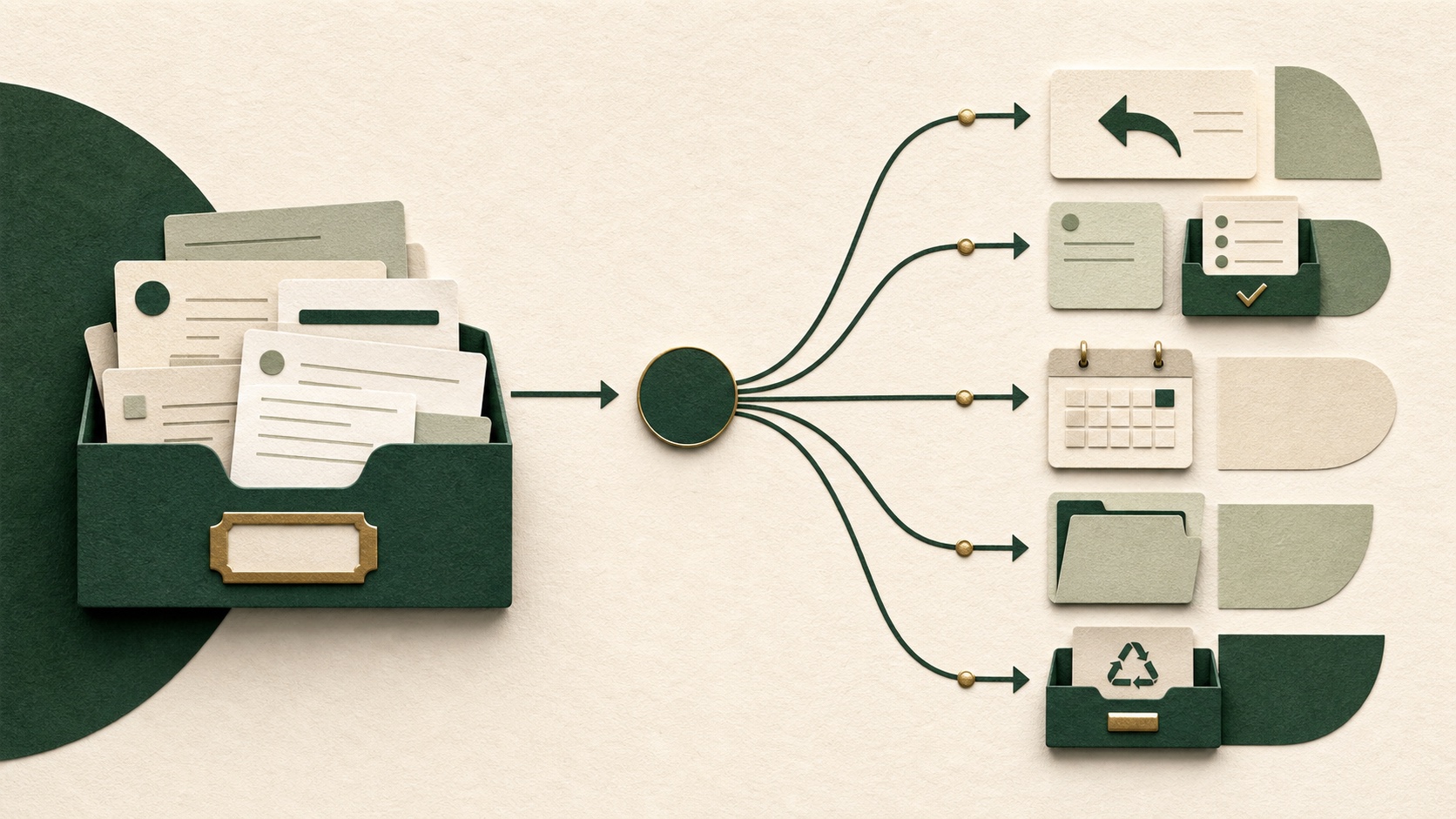
The five destinations
- Reply: communication is the whole remaining action and can be completed safely in the current pass.
- Task: the message creates work that needs time, materials, decisions, or another system to track completion.
- Calendar: the commitment belongs at a specific date or time, with the location or joining information attached.
- Reference: no action remains, but the information must be retained according to your personal or organizational rules.
- Remove: the message has no remaining value, or can be archived, unsubscribed from, reported, or deleted under the rules that apply.

A message may create more than one output. An accepted meeting can become a calendar event and a preparation task. Complete both outputs, then archive the message if policy permits. Do not leave it in the inbox merely to represent both commitments.
Use one fixed decision order
- Check the sender, request, consequence, and real deadline before following the message's urgency language.
- Ask whether an action remains. If not, route it to reference or removal.
- If communication is the only action, reply or schedule a reply task.
- If work remains, create one task that names the next visible action and includes a link back to the message.
- If a specific time matters, create or update the calendar event rather than relying on the inbox position.
- Move the message out of the active queue when every real commitment has another dependable place to reappear.
Write tasks that survive outside the inbox
“Email from Jordan” is not a durable task. The task should say what observable change comes next: “compare Jordan's three requested figures with the approved table” or “ask the project owner which version should be sent.” Include the message link, attachment location, due date, and owner only when they are known.
Do not invent a deadline from the sender's tone. If timing is unclear and the consequence matters, clarify it. If two requests conflict, use the agreed escalation path or ask which should move first.
Use short passes with a stopping rule
Choose a pass you can finish: the newest ten messages, one sender, or messages received since the previous check. Stop at the boundary even if older mail remains. A defined pass produces a known state; an open-ended cleanup can consume the time reserved for the work that email created.
Research on electronic inbox work in primary care found frequent attention switching and an association between more switches and longer inbox work. That observational study involved clinicians and cannot establish what an ordinary email user should do. It does support treating message volume and switching as system conditions, not simply personal discipline failures.
Checking frequency depends on the role. Someone on incident response needs a different system from someone doing long-form analysis. Agree on the urgent channel and response expectation before muting notifications or batching messages.
Protect security before productivity
Unexpected messages that request credentials, personal information, payment, downloads, or urgent account action need a security decision before any productivity shortcut. The US Federal Trade Commission advises people not to click links or download attachments in unexpected messages and to contact the organization through a number, email, or website already known to be real.
Use your organization's reporting process for suspicious messages. Do not forward sensitive content to a personal account, paste confidential mail into an unapproved AI tool, or create filters that bypass required review.
Run a small weekly repair
- Search for messages you marked but never converted into a task or date.
- Check whether task links still open the correct thread or file.
- Remove filters or folders that hide important requests without a review path.
- Unsubscribe from legitimate low-value mail; report suspicious mail instead of interacting with it.
- Notice which category repeatedly stalls—reply, task definition, scheduling, filing, or deletion—and redesign that one route.
Start with five messages
Take the next five messages in one inbox. For each, say the destination before touching another tool: reply, task, calendar, reference, or remove. If it becomes a task, record the next visible action and message link. If it becomes a date, put the useful context in the calendar entry.
If inbox demands repeatedly cause missed obligations, significant distress, or impairment across important areas, consider discussing the concrete pattern with a qualified professional. Bring examples of message volume, response expectations, hidden tasks, failed reminders, and the systems already tried. The useful question is not whether you are bad at email; it is where the current route stops carrying commitments safely.
Sources and further reading
Sources support the health and diagnostic context. Practical workflow suggestions are low-risk editorial adaptations, not clinical treatment.